Getting Started
Installation
Installing Gurobi
AstroQ relies on the Gurobi optimization software to efficiently solve large matrix equations.
Follow these steps to install and set up Gurobi:
Create an Account on Gurobi’s registration site. Select that you are an “Academic,” type in your home institution, and submit the form via “Access Now.” You will receive an email to complete the registration.
Download Gurobi for your OS from this download page. Follow the instructions to run the installer file.
Request an Academic License from your user portal while connected to a university network. You want the ‘Named-User Academic License,’ which has a one-year lifetime. At the end of the year, you can obtain a new license easily within your account (and for free) as long as you have maintained your academic status.
- Retrieve the License by running the command given in the popup window in a shell. It should look like:
This command will download a file called
gurobi.licto your machine.
- Define the GRB_LICENSE_FILE environment variable by adding the following to your
shell profilefile:
Installing AstroQ
We recommend installing AstroQ within a new
Anaconda environment.
To do so, clone the AstroQ Github repository
and run the following commands in the top-level directory:
$ conda env create --name astroq --file environment.yml
$ conda activate astroq
Then install the package:
$ pip install -e .
Installation Test
Run pytest from your terminal to execute a suite of tests verifying that the installation was successful:
$ pytest -v
This may take a few minutes on the first run. The desired result is that all tests pass successfully. However, if you do not have token access to the KPF-CC database, then the test_prep will fail.
Required Files
AstroQ requires six files to run. All example file paths are relative the astroq project directory.
config.ini- Contains configuration information for the AstroQ run.Example:
examples/hello_world/2018B/2018-08-05/band1/config.iniallocation.csv- Contains information about the nights and times when the telescope is available for observation. It must contain appropriate column headers:startend
Times are in format “YYYY-MM-DDTHH:MM”
Example:
examples/hello_world/2018B/2018-08-05/band1/allocation.csv: (first 5 rows shown):start
stop
2018-08-05T10:27
2018-08-05T15:07
2018-08-05T05:47
2018-08-05T10:27
2018-08-06T06:30
2018-08-06T08:33
2018-08-06T05:46
2018-08-06T06:30
request.csv- Contains information about the targets and their observational strategies. It must contain appropriate column headers.unique_id- A unique identifier for the target.starname- The human-readable name of the target.program_code- The program code of the target.ra- The right ascension of the target.dec- The declination of the target.exptime- The exposure time of the target.n_exp- The number of exposures of the target.n_intra_max- The desired number of visits within a night.n_intra_min- The acceptable number of visits within a night.tau_intra- The minimum time (hours) between visits of the target within a night.n_inter_max- The maximum number of unique nights to observe the target.tau_inter- The minimum time (days) between unique night observations of the target.minimum_elevation- The minimum elevation (degrees) of the target.minimum_moon_separation- The minimum separation (degrees) between the target and the moon.
More columns may be added as needed for your queue (e.g. observational parameters like proper motions, magnitudes, temperatures, etc.) but these are optional record keeping columns.
Example
examples/hello_world/2018B/2018-08-05/band1/request.csv:unique_id
starname
program_code
ra
dec
exptime
n_exp
n_intra_max
n_intra_min
tau_intra
tau_inter
n_inter_max
gaia_id
teff
jmag
gmag
pmra
pmdec
epoch
Observing Notes
minimum_elevation
minimum_moon_separation
weather_band_1
weather_band_2
weather_band_3
inactive
e1
HIP1532
U001
4.773176618436250
-9.964852409
360
2
1
1
0
1
20
DR3_2428162410789155328
5000
7.376
9.316666
-36.325
-301.491
2000
33.0
33.0
TRUE
TRUE
TRUE
FALSE
e2
TOI-1670
U002
259.0173367
72.16115935
1200
1
1
1
0
1
30
DR2_1651911084230149248
6200
8.968
9.823196
-6.007
4.923
2000
33.0
33.0
TRUE
TRUE
TRUE
FALSE
e3
191939
U003
302.02397977674000
66.85057684
300
1
1
1
0
25
5
DR3_2248126315275354496
5000
7.597
8.782845
150.194
-63.988
2000
33.0
33.0
TRUE
TRUE
TRUE
FALSE
e4
HAT-P-11
U004
297.7093637403900
48.080861497360000
700
1
1
1
0
2
22
DR3_2086512227851023872
6000
7.608
9.158262
126.095
232.726
2000
33.0
33.0
TRUE
TRUE
TRUE
FALSE
e5
KELT-2
U005
92.66393860111000
30.957142614630000
240
1
1
1
0
1
30
DR3_3438059369839738624
8000
7.669
8.59387
16.726
-2.155
2000
33.0
33.0
TRUE
TRUE
TRUE
FALSE
e6
WASP-107
U006
188.3868505
-10.14617377
450
1
1
1
0
1
10
DR3_3578638842054261248
6000
9.378
11.183329
-96.665
-9.372
2000
33.0
33.0
TRUE
TRUE
TRUE
FALSE
e7
Kepler-10
U007
285.67942245537700
50.24130600481640
50
1
4
2
1
5
30
DR3_2132155017099178624
5000
9.889
10.920031
-18.483
41.382
2000
33.0
33.0
TRUE
TRUE
TRUE
FALSE
e8
55Cnc
U008
133.1492129350180
28.330820831797200
300
1
2
2
2
1
5
DR3_704967037090946688
4000
4.59
5.732681
-485.681
-233.517
2000
33.0
33.0
TRUE
TRUE
TRUE
FALSE
e9
219134
U009
348.3207290015030
57.16835661767190
60
3
1
1
0
1
30
DR3_2009481748875806976
5000
3.86
5.231896
2074.414
294.452
2000
33.0
33.0
TRUE
TRUE
TRUE
FALSE
e10
51Pegasi
U010
344.3665854
20.768832511140000
10
1
1
1
0
1
10
DR3_2835207319109249920
5678
4.66
5.283212
207.328
61.164
2000
33.0
33.0
TRUE
TRUE
TRUE
TRUE
e11
KIC8006161
U010
344.3665854
20.768832511140000
10
1
1
1
0
1
10
DR3_2835207319109249920
5678
4.66
5.283212
207.328
61.164
2000
33.0
33.0
TRUE
TRUE
TRUE
FALSE
past.csv- Contains information about the past history of observations. While it may be blank, it must contain appropriate column headers:id- the unique identifier for the target.target- the human-readable name of the target.semid- the program code of the target.exposure_start_time_UT- exposure start in UT (legacy column nameexposure_start_timeis still accepted).exposure_start_time_local- optional; wall time fromUTCoffsetwhen exporting from the OB database.exposure_time- the recorded duration of the exposure.NightOf- optionalYYYY-MM-DDobserving-night label: local calendar date of the most recent sunset at the observatory (from configobservatory) before the exposure. Groups pre-midnight and post-midnight data on the same night. If omitted, it is computed when past history is loaded (sunset if the site resolves in astroplan, else a local-noon night boundary).
Example
examples/hello_world/2018B/2018-08-05/band1/past.csv:id
target
semid
timestamp
exposure_start_time_UT
exposure_start_time_local
exposure_time
NightOf
observer
comment
e10
51Pegasi
U010
2018-08-02T05:49:15
2018-08-02T05:44:15
2018-08-01 19:44:15
180
2018-08-01
JackL
Hello World simulated observation
e2
TOI-1670
U002
2018-08-02T20:33:28
2018-08-02T20:28:28
2018-08-02 10:28:28
150
2018-08-01
JackL
Hello World simulated observation
e2
TOI-1670
U002
2018-08-03T20:33:28
2018-08-03T20:31:03
2018-08-03 10:31:03
150
2018-08-02
JackL
Hello World simulated observation
e8
55Cnc
U008
2018-08-02T01:25:13
2018-08-02T01:20:13
2018-08-01 15:20:13
120
2018-07-31
JackL
Hello World simulated observation
e8
55Cnc
U008
2018-08-03T01:25:13
2018-08-03T01:22:18
2018-08-02 15:22:18
120
2018-08-01
JackL
Hello World simulated observation
e6
WASP-107
U006
2018-08-25T06:05:09
2018-08-02T06:00:09
2018-08-01 20:00:09
180
2018-08-01
JackL
Hello World simulated observation
programs.csv- Contains information the awarded time to each program. Useful for plotting later. While it may be blank, it must contain appropriate column headers:program- the program code.hours- the hours of awarded time to the program.nights- the number of nights awarded to the program.
Example
examples/hello_world/2018B/2018-08-05/band1/programs.csv:program
hours
nights
U001
1.0
1.0
U002
1.0
1.0
U003
1.0
1.0
U004
1.0
1.0
U005
1.0
1.0
U006
1.0
1.0
U007
1.0
1.0
U008
1.0
1.0
U009
1.0
1.0
U010
1.0
1.0
custom.csv- Contains information about the specific time windows when targets may be observed. While it may be blank, it must contain appropriate column headers:unique_id- the unique identifier for the target.starname- the human-readable name of the target.start- the start time of the time window.stop- the stop time of the time window.
Times are in format “YYYY-MM-DD HH:MM”
Example
examples/hello_world/2018B/2018-08-05/band1/custom.csv:unique_id
starname
start
stop
e1
HIP1532
2018-10-01 00:00
2018-10-30 00:00
e1
HIP1532
2018-08-01 00:00
2018-08-15 00:00
The kpfcc subcommand of prep (see below) compiles and prepares all of these necessary files for the KPF-CC program specifically. Use of this command requires token access to the KPF-CC database. If you are using AstroQ for a different facility, then you must prepare these files through your own means. Feel free to write your own “prep” command to automate the process.
- It is strongly recommended that you create the following folder structure for your AstroQ project:
<upstream path>/<semester>/<date>/<band>/
<upstream path> is the path to the top-level directory of your AstroQ project.
<semester> is the semester ID of your project (e.g. 2025B).
<date> is the date you are generating the schedule (e.g. 2025-08-01).
<band> is the weather band number (use band1 if you not interested in multiple bands).
For example, if your upstream path is
/Desktop/, your semester is2025B, your date is2025-08-01, and your band is1, then your folder structure should be: /Desktop/2025B/2025-08-01/band1/In this folder structure, you should place (or automate the creation of) the necessary files above to run AstroQ. We recommend a new folder for every run, so as to create a history of schedules. You may further create additional weather bands within the date level. Each band should get its own copy of all files.
Command Line Interface
Test your installation further by running some of the commands below. We will use AstroQ’s command line interface to mock up a toy observing schedule. After performing the steps in the Installation section, you should have access to the astroq binary at the command line. If not, ensure that you have run pip install -e . in the top-level directory of the repository.
Let’s see which subcommands are available using astroq --help:
$ usage: astroq [-h] [-V] {bench,plot,kpfcc_prep,webapp,plan-semester,plan-night,compare} ...

    AstroQ: Optimized observation scheduling

    optional arguments:
    -h, --help            show this help message and exit
    -V, --version         Print version number and exit.

    subcommands:
    {bench,plot,prep,webapp,plan-semester,plan-night,compare}
The AstroQ command-line interface provides the following subcommands:
bench- Runs the benchmark test. Here you can compare your computer’s performance with the AstroQ benchmark from our paper, Lubin et al. 2025.prep- Compile and prepare all necessary files. For the KPFCC program, there is an additional subcommandkpfcc. Note that if you are building a queue for a different facility, you will have to build your own subcommand.webapp- Launch web app to view interactive plots for a given solution of AstroQ.plan-semester- Solve for the optimal semester-long schedule, determining what stars to observe on what nights. This is the heart of AstroQ.plan-night- Solve for the optimal slew path using the TTP package.compare- Compare two AstroQ solutions.
Below are more detailed explanations of these commands and their outputs.
Hello World Example
To create your mock observing schedule, let’s run the hello world example. Here we have supplied the necessary files. We will create a schedule for the first night when we have the telescope, 2024-08-02, as specified in the config file. Navigate to your AstroQ/ directory and then run:
$ astroq plan-semester -cf examples/hello_world/config_hello_world.ini
Let’s take a look at the outputs produced:
$ ls -ltr examples/hello_world/2018B/2018-08-05/band1/outputs

    -rw-r--r--@ 1 jack  staff    3153 Oct 29 12:15 semester_plan.csv
    -rw-r--r--@ 1 jack  staff  230542 Oct 29 12:15 serialized_outputs_dense_v1.csv
    -rw-r--r--@ 1 jack  staff  253640 Oct 29 12:15 serialized_outputs_dense_v2.csv
    -rw-r--r--@ 1 jack  staff     346 Oct 29 12:15 runReport.txt
    -rw-r--r--@ 1 jack  staff     873 Oct 29 12:15 request_selected.csv
    -rw-r--r--@ 1 jack  staff  244512 Oct 29 12:15 semester_planner.h5
semester_plan.csvcontains the id, day, slot and name of the scheduled observations. sorted by target name. See example:r
d
s
name
e1
4
62
HIP1532
e1
5
66
HIP1532
e1
8
65
HIP1532
e1
12
61
HIP1532
e1
13
82
HIP1532
e1
61
77
HIP1532
e1
63
76
HIP1532
e1
64
77
HIP1532
e1
86
67
HIP1532
e1
87
67
HIP1532
e2
4
36
TOI-1670
e2
5
35
TOI-1670
e2
8
41
TOI-1670
serialized_outputs_dense_v1.csvcontains the same information, but now all slots, even those not scheduled to have an observation are included, and it is ordered by time. See example:d
s
r
name
0
0
0
1
0
2
0
3
0
4
0
5
0
6
0
7
0
8
0
9
0
10
0
11
0
12
0
13
0
14
…
…
…
…
4
62
e2
HIP1532
4
63
serialized_outputs_dense_v2.csvis identical toserialized_outputs_dense_v1.csv, but now slots that cannot be filled for all stars (like sky brightness or telescope allocation, are denoted with an “X”). See example:d
s
r
name
0
0
X
0
1
X
0
2
X
0
3
X
0
4
X
0
5
X
0
6
X
0
7
X
0
8
X
0
9
X
0
10
X
0
11
X
0
12
X
…
…
…
…
4
62
e2
HIP1532
4
63
runReport.txt: contains some basic statistics about the fullness of the schedule. See example (note, this schedule is not supposed to be a good one!):Stats for Round1 ------------------------------------------------------ N slots in semester:26496 N available slots:2874 N starting slots scheduled: 183 N reserved slots: 26 N total slots scheduled: 209 N slots left empty: 2665 N slots requested (total): 807 Utilization (% of available slots): 7.272% Utilization (% of requested slots): 25.898%
request_selected.csv: contains a copy of the request.csv file but only for the targets that were selected to be observed.:semester_planner.h5: is a serialized and compressed version of the splan object used for scheduling. This will be used later in the webapp/plotting routines and serves as a record of the schedule inputs/outputs.
Now that we have the stars to be observed each night of the semester, let’s determine the optimal ordering of the stars selected for tonight, mimizing slew times, to generate a night plan:
$ astroq plan-night -cf examples/hello_world/config_hello_world.ini
Here are the new files in examples/hello_world/outputs/:
-rw-r--r--@ 1 jack  staff     447 Oct 29 13:36 ttp_prepared.csv
-rw-r--r--@ 1 jack  staff     433 Oct 29 13:36 TTPstatistics.txt
-rw-r--r--@ 1 jack  staff     158 Oct 29 13:36 ObserveOrder_2018-08-05.txt
-rw-r--r--@ 1 jack  staff    1157 Oct 29 13:36 script_2018-08-05_nominal.txt
-rw-r--r--@ 1 jack  staff   16080 Oct 29 13:36 night_planner.h5
ttp_prepared.csvis the input to the TTP solver. It contains the target information in the format required by the TTP solver. See example and the TTP repository for more info:Starname
RA
Dec
Exposure Time
Exposures Per Visit
Visits In Night
Intra_Night_Cadence
Priority
First Available
Last Available
e1
4.77317661843625
-9.964852409
360
2
1
0
10
2018-08-05 10:20
2018-08-05 15:00
e2
259.0173367
72.16115935
1200
1
1
0
10
2018-08-05 05:50
2018-08-05 08:50
e7
285.679422455377
50.2413060048164
50
1
4
1
10
2018-08-05 05:50
2018-08-05 12:20
e9
348.320729001503
57.1683566176719
60
3
1
0
10
2018-08-05 08:40
2018-08-05 15:00
TTPstatistics.txtcontains some basic statistics about the TTP solution. See example:Stats for TTP Solution ------------------------------------ Model ran for 0.05 seconds Observations Requested: 7 Observations Scheduled: 7 Maximum Observations Bound: 1 ------------------------------------ Observing Duration (min): 560.00 Time Spent Exposing (min): 40.57 Time Spent Idle (min): 510.51 Time Spent Slewing (min): 8.92 Minimum Slew Bound (min): 4.17 ------------------------------------
ObserveOrder_2018-08-05.txtthe timestamps at which each star is set to be observed. See example:unique_id
Target
StartExposure
e2
TOI-1670
05:47
e7
Kepler-10
06:07
e7
Kepler-10
07:07
e7
Kepler-10
08:47
e9
219134
08:49
e1
HIP1532
11:41
e7
Kepler-10
11:59
script_2018-08-05_nominal.txtis a backwards compatible file in the style of the old HIRES queue night plans.night_planner.h5: a serialized and compressed version of the night planner object use to schedule. This will be used later in the webapp/plotting routines.
Now we can launch the webapp to view the schedule. This will launch on a local server at http://localhost:50001. When it launches, append “/2018B/2018-08-05/band1/admin” to the URL to view the admin page. Check out and familiarize yourself with the various figures and reports.
$ astroq webapp -up examples/hello_world/
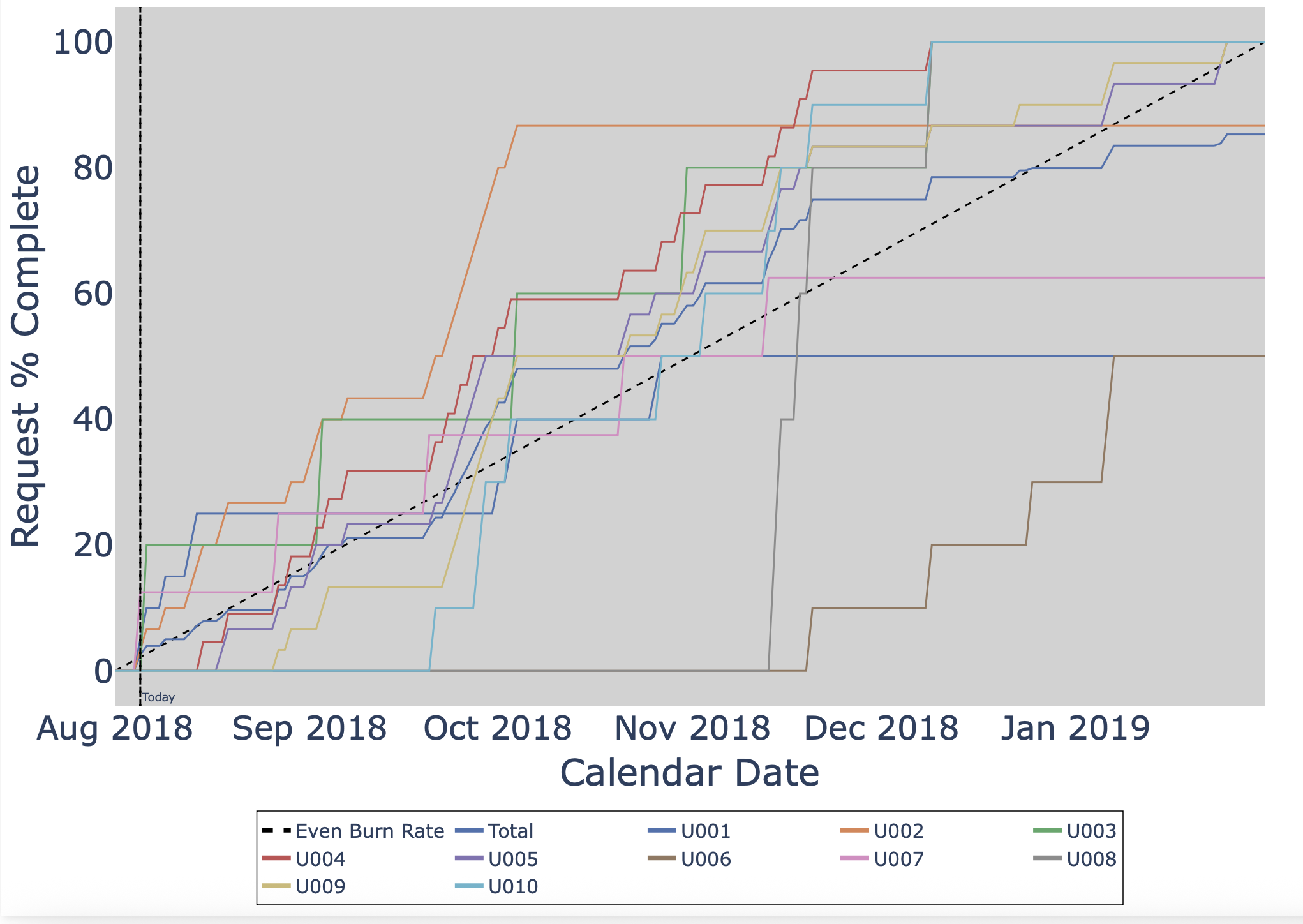
Scrolling down a bit, you should see the “Cumulative Observation Function (COF)” plot which describes the completion rate of each program as a function of time:
Scrolling down a bit, you should see the “birdseye” plot of the schedule look something like this:
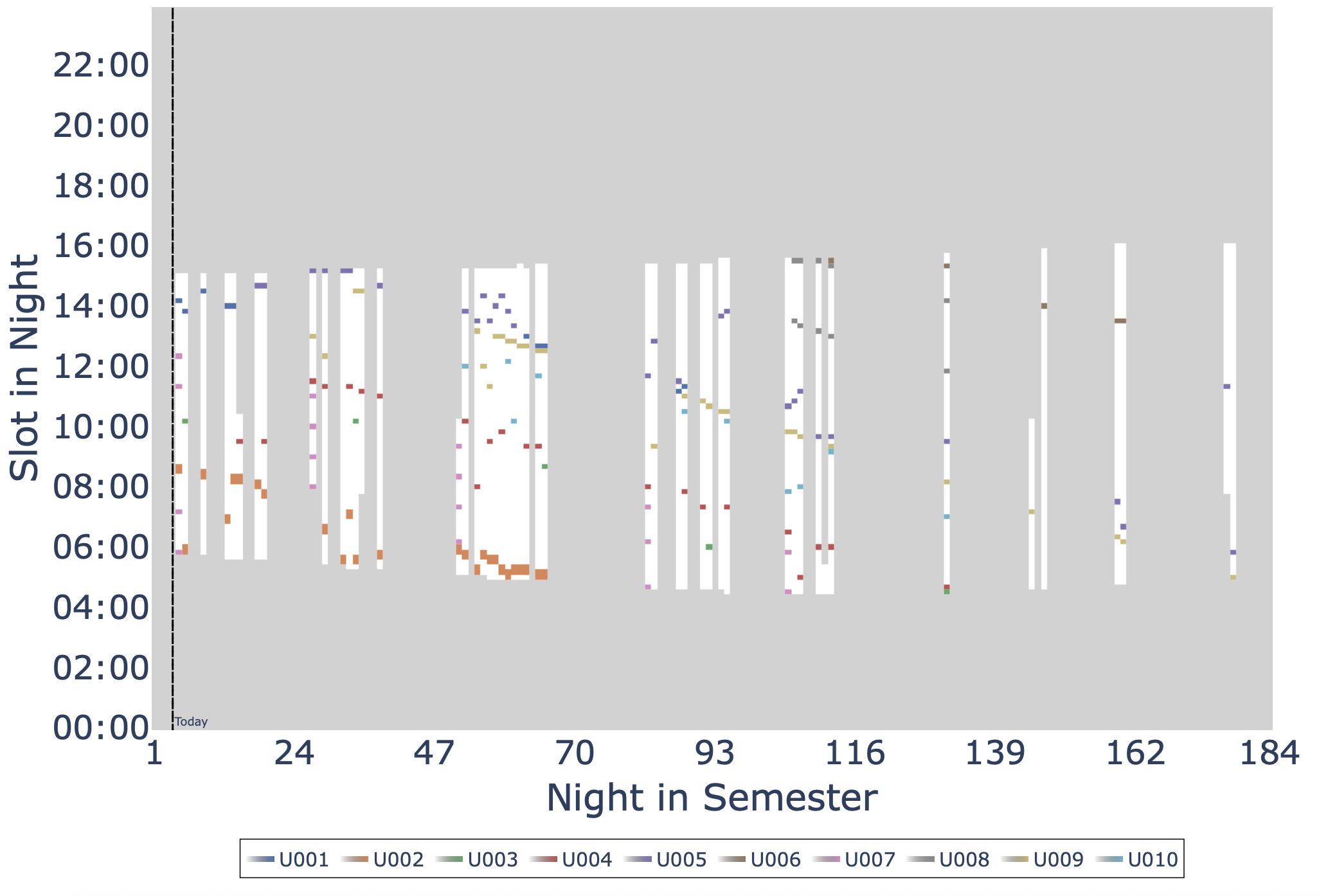
Notice that two program perform poorly, U001 and U006. This is entirely explainable and stems from the fact that the requests in these programs are infeasible. For example, let’s investigate U006’s target, WASP-107. First displaying all the slots that are available for observations this semester:
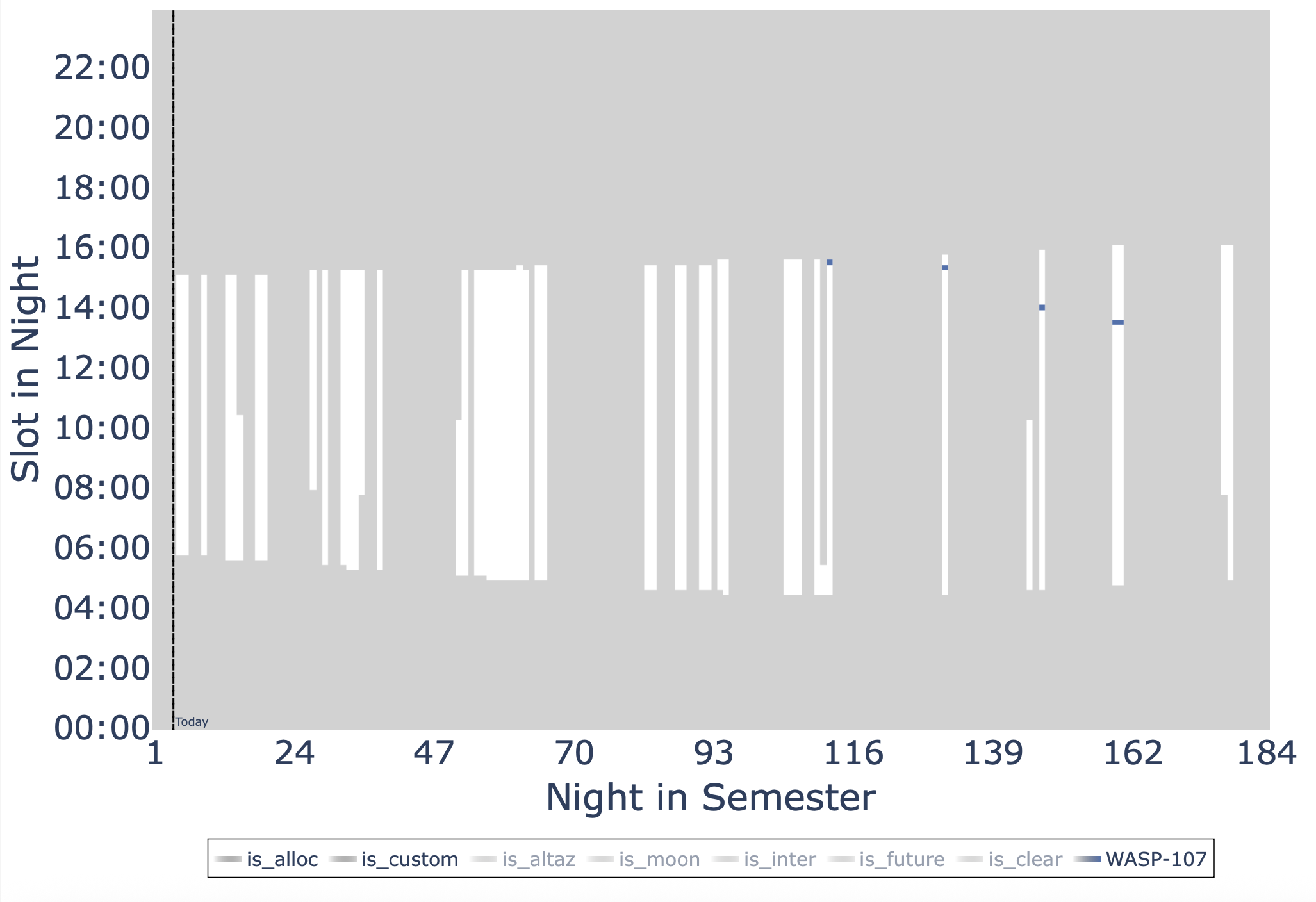
This shows there is lots of available time to schedule the target. So why isn’t it getting scheduled more? Turning on some of the individual constraint maps reveals the problem. First we turn on the is_altaz, which blocks out the times that are not available for scheduling this target due to the natural seasonality of the star and the pointing limits of the telescope:
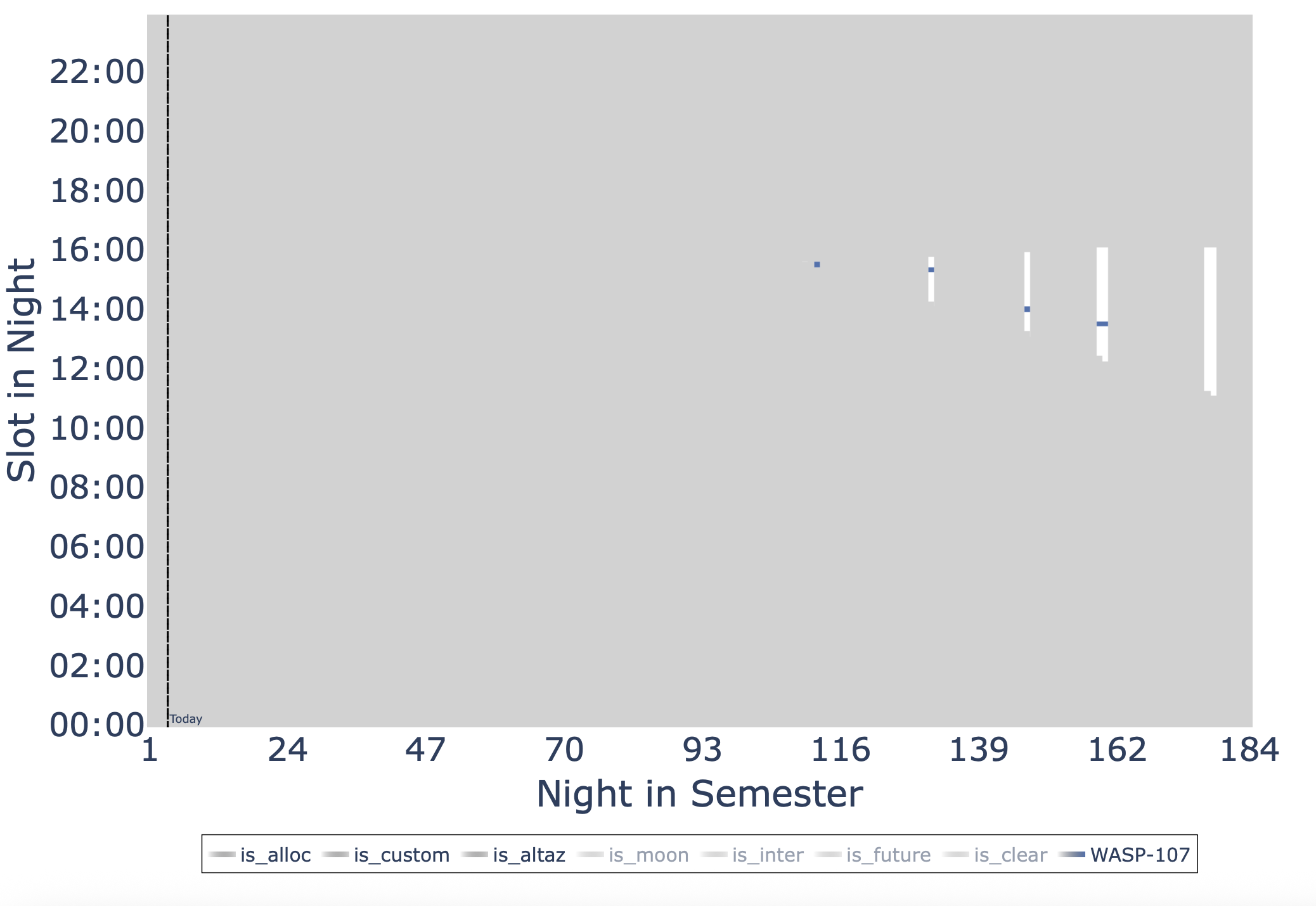
Immediately we see that the vast majority of our allocated time is not ammenable to observing this target. But what about those last two days, why isn’t the target scheduled then? We can further turn on the is_moon, which blocks out the times that are not available for scheduling this target due to the moon’s position in the sky and we see that this is the cause of conflict:
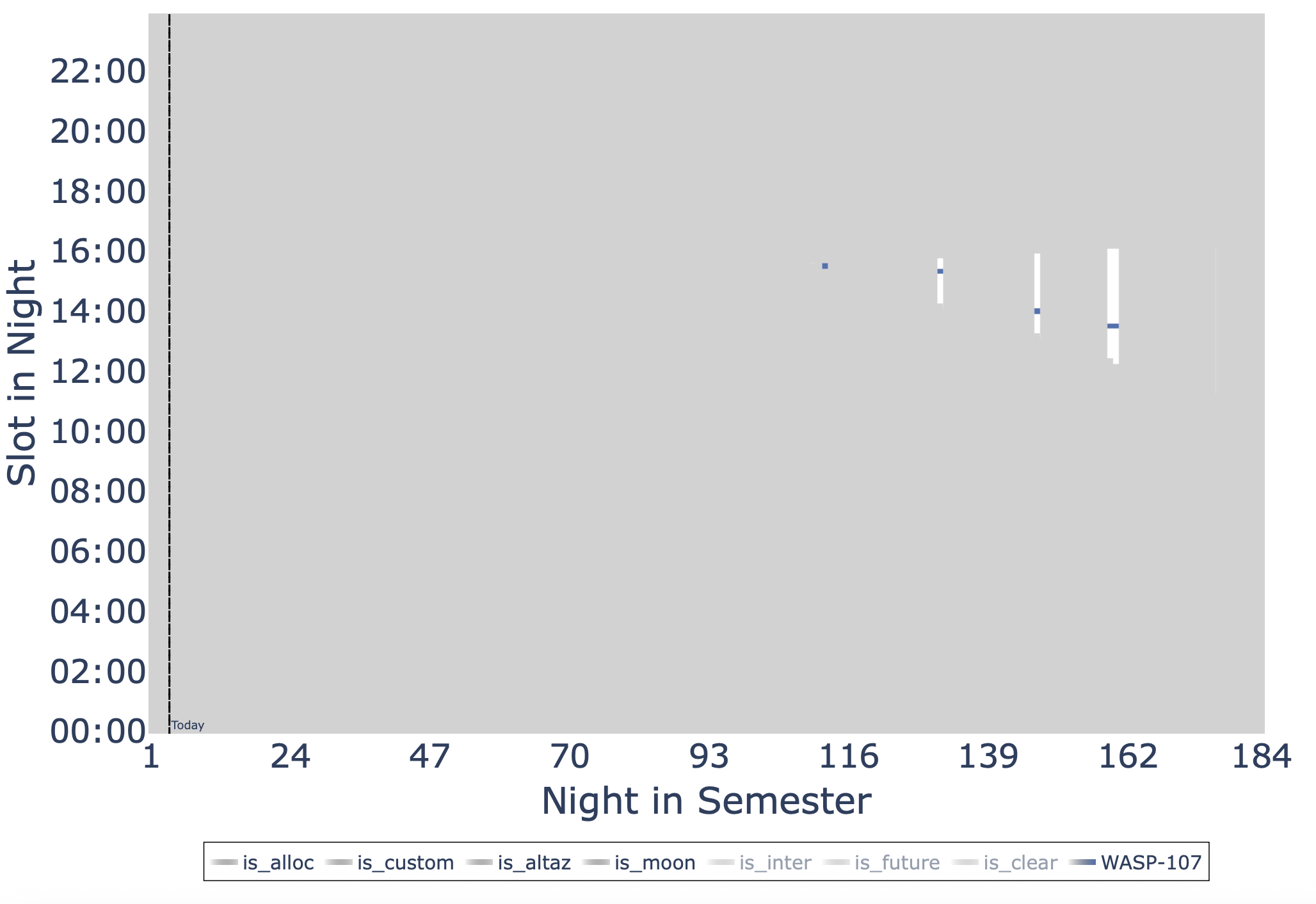
Now we can feel confident that AstroQ is scheduling this target as often as is feasible. The request itself is infeasible, thus the low completion rate. U001’s HIP1532 target is amenable to observations all semester, but it has a custom map that severly restricts when it can be observed, hence a low completion rate. These tools allow us the really dive into any target and understand why it is or is not being scheduled.
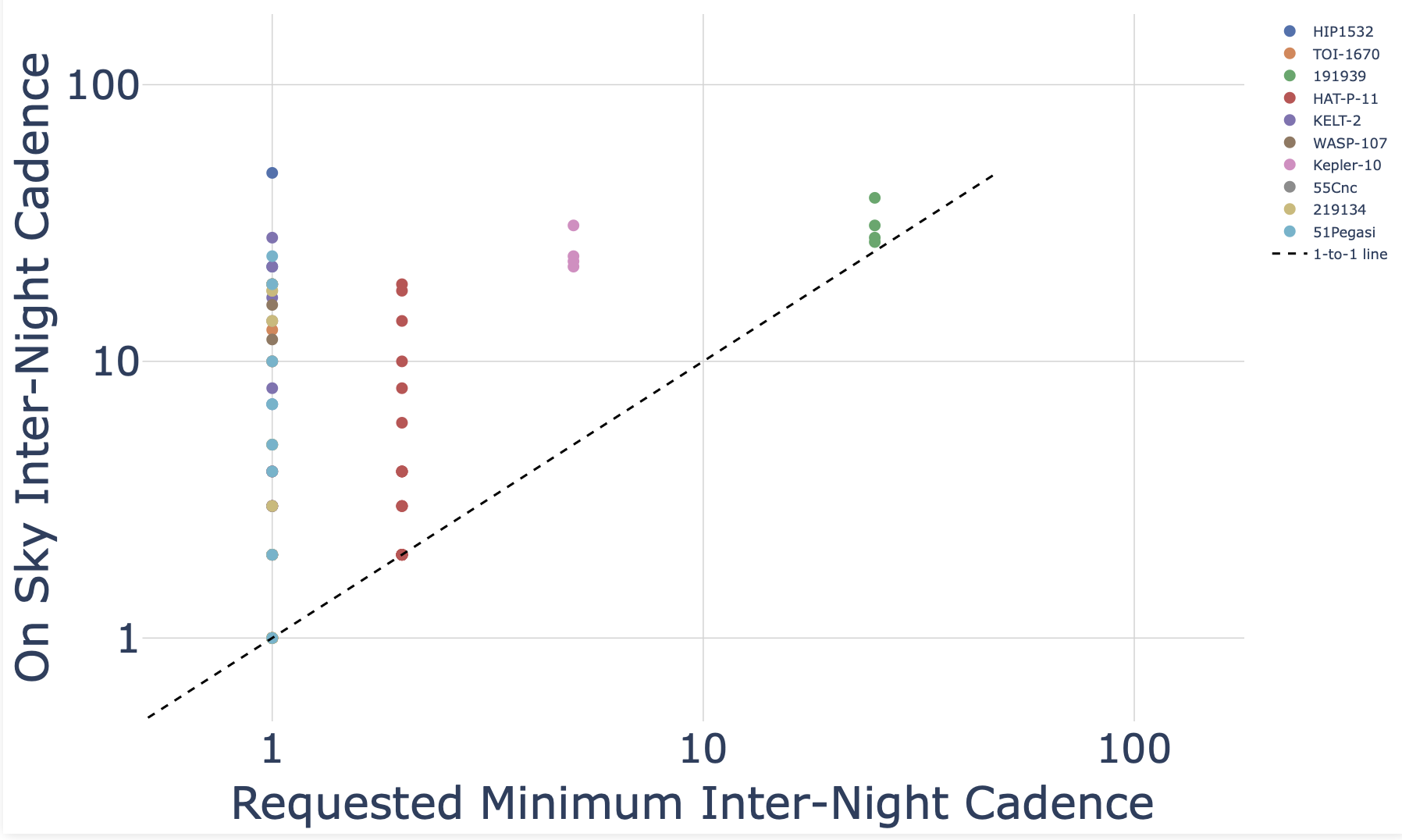
Looking at some additional plots, we track the on-sky cadence vs the requested cadence. We don’t want to violate the PI’s desired minimum cadence so all dots on this plot should be above the dashed line, which, is confirmed:
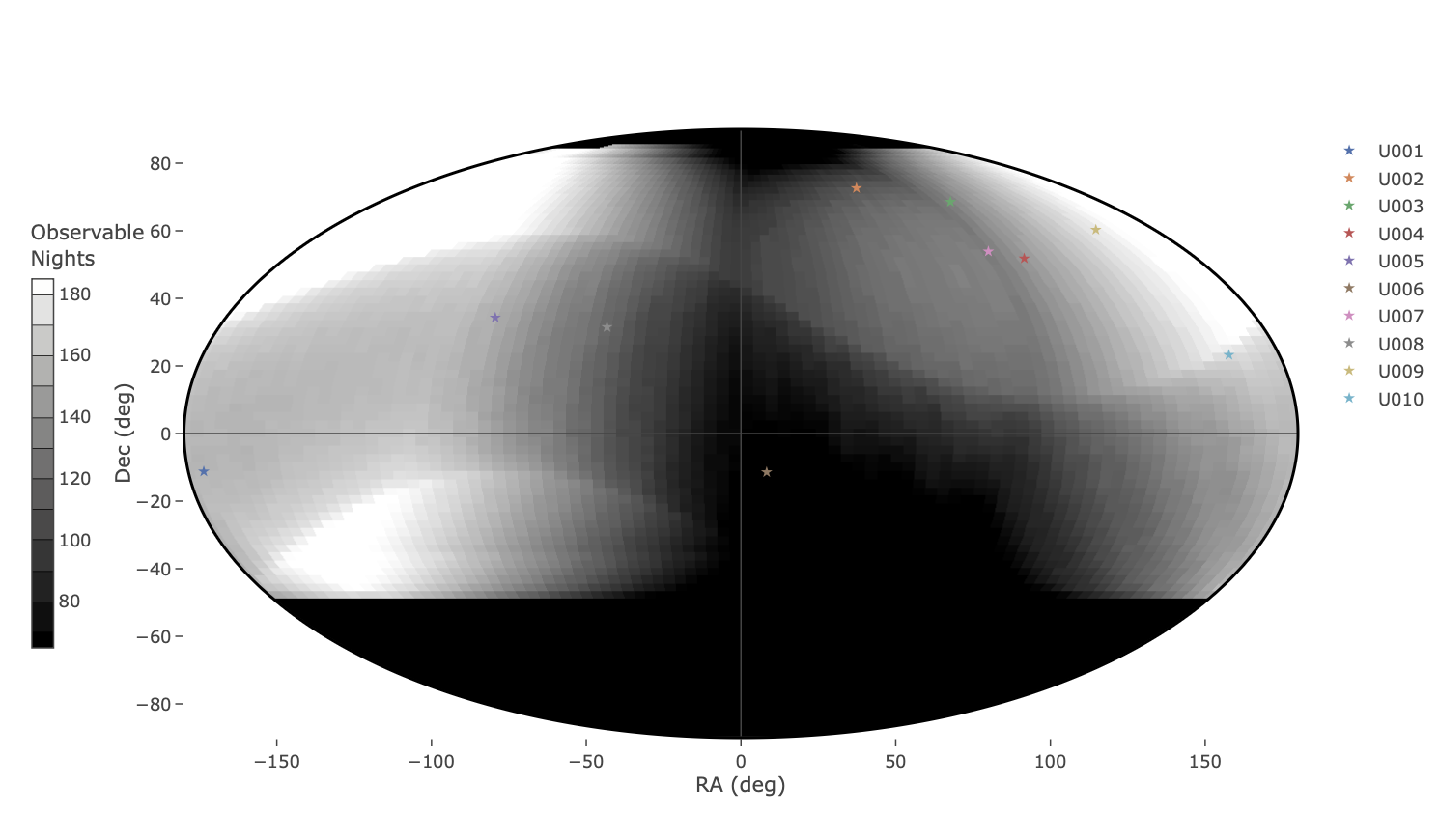
Lastly, we look at the distribution of the targets across the sky. Against the grayscale heatmap, we can get a sense for how many nights in the semester a given location on the sky is observable, imagining we had the telescope all night every night. Here we can quickly see that WASP-107 is in a dark region of the sky, meaning it is not amenable to many observations in the semester. Couple that with the fact that we don’t actually have all night every night to observe, this target is severely limited in its observability and hence has the low completion, which we walked through above. This grayscale map captures the intricate pointing limits of the K1 telescope easily.
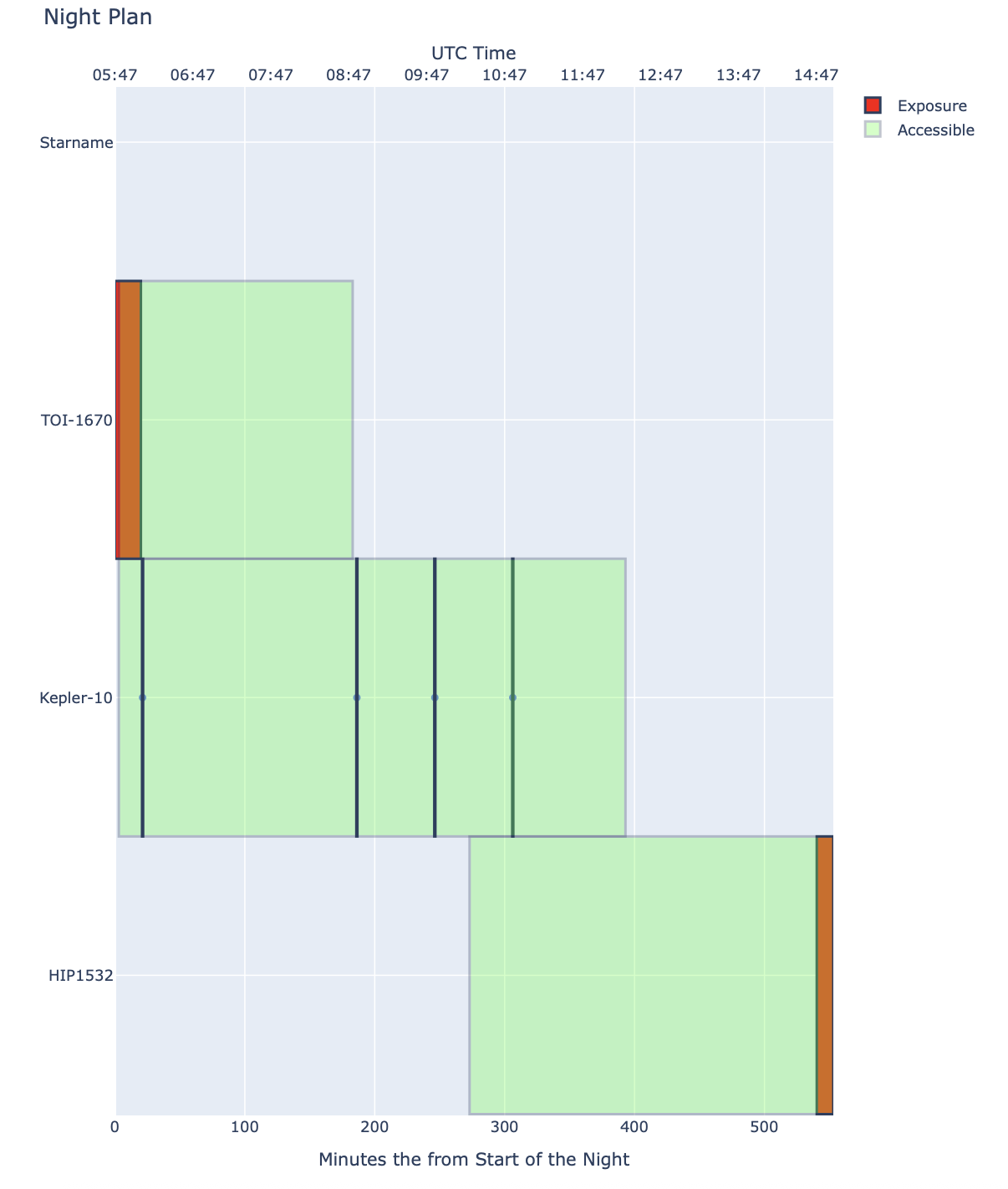
Next we can investigate the plan for tonight. After the the slew path in minimized through the TTP solver, we have a suite of plots availabe to us for insight. First we look at the “ladder” plot. The observations are ordered in time from top to bottom. Green bars indicate the spans of time when the target is observable (above pointing limits), and the red bars indicate the times when we are set to observe the target. We can easily see the plan for the night, and see how tight or loose the windows are to observe a particular target.
Then we have the slew path animation (screenshot below). This is a polar plot of the telescope’s slew path with an orange line showing the path of the telescope over the night as the defined optimal path. The red regions are below/above telescope pointing limits and are unique to K1 telescope. The slider at the bottom allows us to select a time in the night and see where we are and where we are going next.
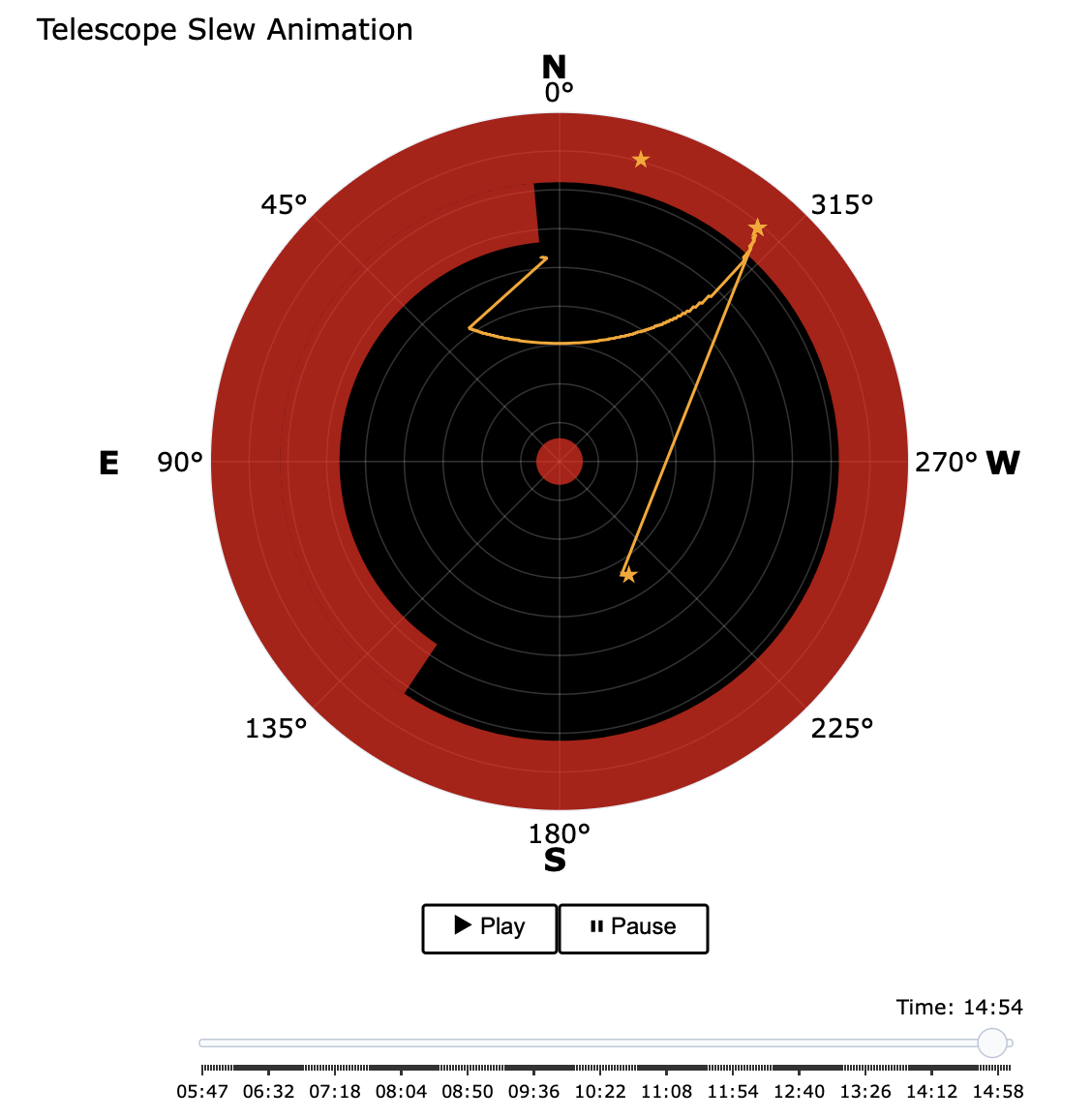
The Hello World Example is an easy model to solve. It only has 10 requests, with a total of 282 observations to schedule across and entire 6 month semester…a human could do this easily. In terms of model size, it is only 4598 rows by 8285 columns with 65656 nonzeros.
Try something a bit more complex by running our benchmark test. This is a realistic semester model scheduling 200 requests with programs of different observational strategies inspired by real observing programs. This model is 56009 rows by 329369 columns with 3820641 nonzeros, significantly bigger and not human-solvable.
$ astroq bench -cf examples/bench/config_benchmark.ini -ns 12
The inputs and expected outputs are well defined in our paper, compare your computer’s performance to ours! See Lubin et al. 2025.